


This article is part 3/4 of a series about free plugins and samples to use in REAPER, especially for beginners or people low on budget. Though, plugins showcased here can be used by any kind of user, and in any other DAW which supports VST and VST3 plugin format.
- 🎤 Best Free Audio FX VST Plugins (2026)
- 🎵 Best Free Instruments VST Plugins (2026)
- 🎻 Best Free MIDI FX VST Plugins (2026)
- 💥 Best Free Sounds Effects and Musical Samples (2026)
Introduction
MIDI FX plugins (or simply, MIDI plugins) are meant to transform, generate or visualize MIDI data on the fly. They answer various purposes (Mapping, Generation, etc…), so having some can be quite useful.
Fortunately for REAPER users, they are a lot of very good native MIDI JSFX effects utilities (more about JSFX on this article), and a lot others have been made by the community, shared on stash or via ReaPack (for eg: these ones. Note that other DAW users can un JSFX as well thanks to YSFX plugin). So, the need to look for third-parties MIDI VST for REAPER users is low. Yet, as VST plugin format allows more advanced UI and features, it definitely worth taking a look at what is out there.
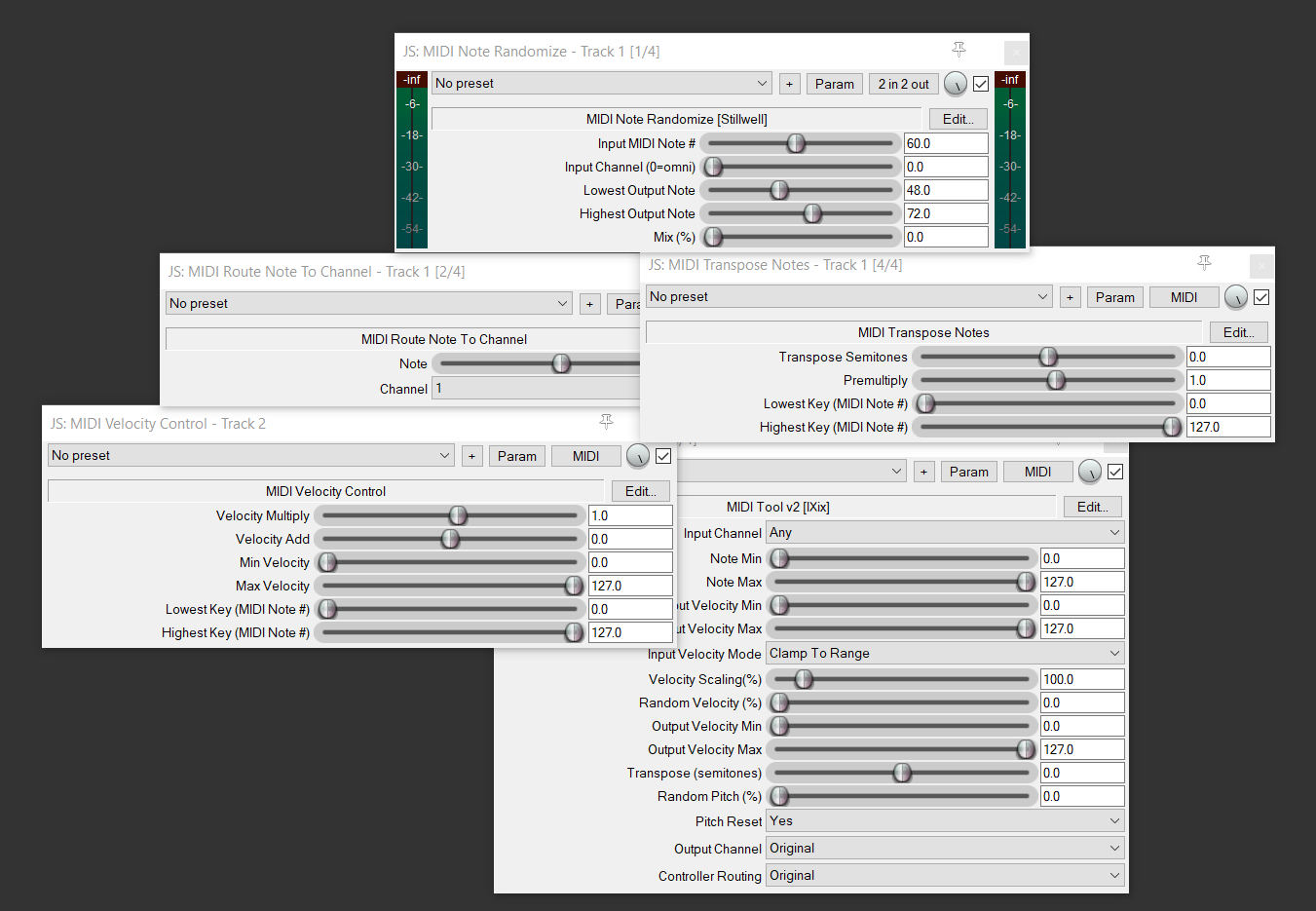
This list will be less big than the other articles of the series. Indeed, MIDI plugins aren’t the most widespread VST. So if you only consider MIDI plugins which are free, with modern UI, good ergonomics, still maintained and not too specific, there are only few things left. But these is quite good, and they definitely deserve a proper showcase! Also, the commercial MIDI plugins listed here as wall are very advanced, and deserve a look as well.
I tried to come up with clear categories of plugin, but lots of plugins could in fact fit into multiple ones. For eg, a MIDI Mapper plugin could have some MIDI Harmonization features, some sequencers could have some arpeggiation features, and some musical theory and compositions tools could do all of that. That is why I encourage you to read the full list, just in case something is placed in another category that the one you would be expecting it.
Well, enough introduction, we all know how this kind of article is read: just scroll down, check the plugin UI, and click on whatever seems to be nice to you!
Note: This article isn’t sponsored in anyway by any third-parties, and took days to write. It isn’t generated by a thoughtless IA, but by an actual human, with real experience in sound creation (audio and music) and sound technology. If you want to support my work it will be very appreciated! ❤️
MIDI Mappers – Routers – Filters
MIDI Mapping is about transforming one signal type or property into other ones. Converting a MIDI note to a CC, routing MIDI CC from one channel to another etc…
REAPER native plugin: Various JSFX
There are lot of JSFX for this category in REAPER native (see JSFX MIDI Mappers and JSFX MIDI Filters), so I will only showcase those which really push things to higher level.
Best Commercial Alternatives
- Nextmidi – Divisimate: advanced plugin to automatically map MIDI notes to different virtual instruments, for orchestral composition (allowing to handle articulations and different sections of the orchestra more easily)
- Pitch Innovations – Fluid Pitch: upscale the pitchwheel of your controller by forcing pitch bended notes to stay on a pre-defined scale
CodeFN42 – NoteMapper
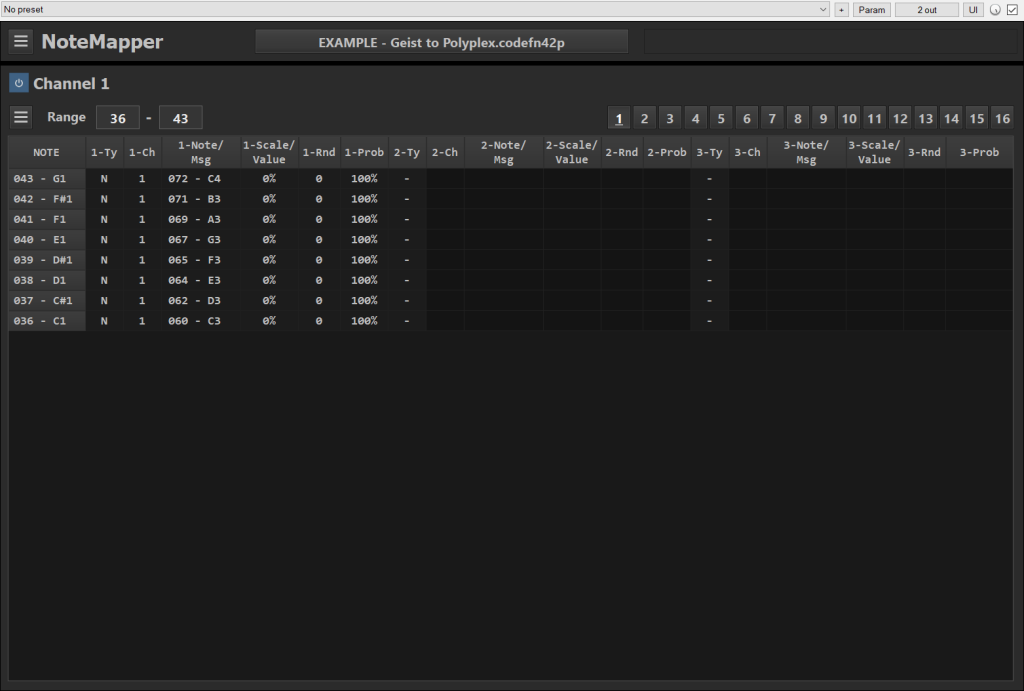
In NoteMapper, you can define various note as input, and choose outputs for them. This allows to build complete note maps, which can be useful for drum remapping (between an E-Drum and a VSTi for eg, if none of these allow mapping easily).
Note that you even have some scaling and probability features.
Pros:
- Lot of features
- Straightforward table-based UI
Cons:
- UI doesn’t scale with mouse (only via parameters in settings)
- A bit more color could help readability
- Windows only
Attila M. Magyar – MPE Emulator
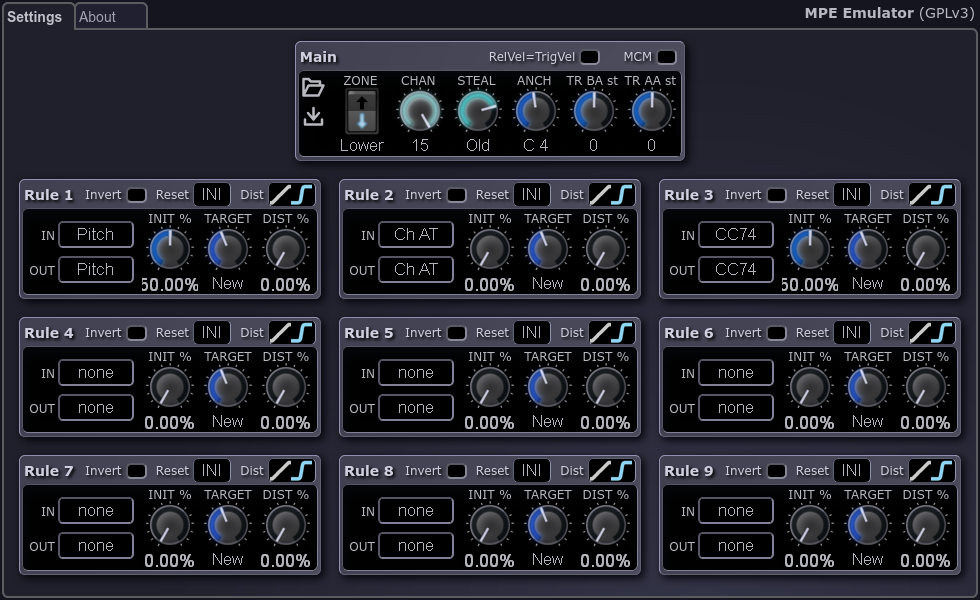
On some advanced keyboards, you can have extra MIDI data after a key press. This allows to have more expressive playing. For eg, you can have pitch and timbre variations over time data, and these variations will be applied per notes, by what we called a MPE compatible virtual instruments (typically, modern synths).
Though a lot of MIDI instrument controllers doesn’t support MPE. Though, they are some tricks to upscale these instruments to something more MPE-like, and this is what this plugin is for. It will of course doesn’t match the power of real MPE controllers, but it can be helpful.
Bonus, this plugin has been initially developed in JSFX by a member of REAPER community!
Pros:
- Open-source
- Extensive documentation
Cons:
- A bit complex
MIDI Harmonizers
This category is about turning single notes input into full chords, relative to a predefined scale.
REAPER native plugin: JSFX – MIDI Chord In Key

Best Commercial Alternatives
- ADSR Mosaic Beat – Chord Prism: advanced harmonizer, with the possibility to change chords types and arpeggios patterns via keyswitch
CodeFN42 – Chordz
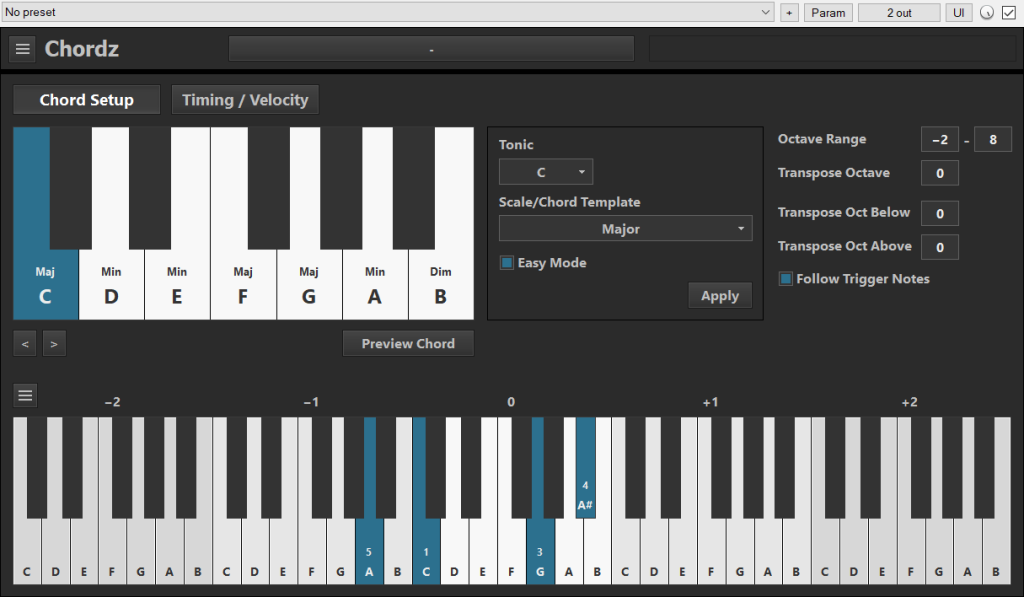
MIDI Chorz is a simple MIDI chords generator, from one single note input. You can define the key, the scale, and few others extra settings.
Pros:
- Lot of scale types
- Piano view
Cons:
- Windows only
- UI doesn’t scale with mouse (only via parameters in settings)
- No chord inversions
MIDI Generators
What I call generation here is the creation of MIDI signal from a set of parameters, not from an incoming signal modification. Generators can create random / unpredictable / surprising outputs, useful for inspiration or to make generative musics.
Best Commercial Alternatives
- ADSR – MIDIGRiD: matrix based note generation, with modern UI
- ADSR – Hexcel: unique hex grid based MIDI generation
CodeFN42 – Transition

Transition generation concept is quite fun, and can give you surprising results.
Pros:
- Nice generation concept
- Readable UI
Cons:
- Windows only
- UI doesn’t scale with mouse (only via parameters in settings)
- Matrix could take more UI space and have more colors
MIDI Sequencers
Programming MIDI patterns, and triggering them from notes send via MIDI controller, are techniques often used for playing with virtual drum machine or loop based composition. The way these sequences can be programmed can vary a lot. It is without surprise one of the most diverse MIDI plugins category.
Note that a lots of sampler, especially those related to drums, already have a built-in sequencer, and sometimes advanced enough to not require any dedicated plugin.
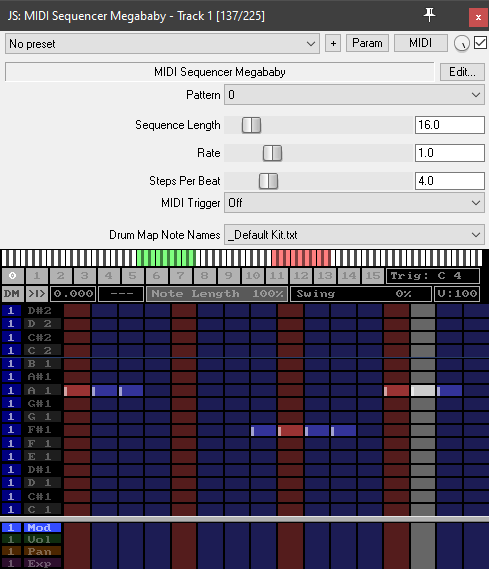
REAPER native plugin: JSFX – MIDI Sequencer Megababy
Honorable Free Alternatives
- Surge Synth Team – Stochas: Open source simple step sequencer, but not as good UI as the other on this page.
Best Commercial Alternatives
- ADSR – Orbit: Good looking euclidean sequencer
- 510k Arts – SEQUND & POLYLLOP: Another nice and modern sequencer
- Thenatan – PERX: Multi euclidean sequencer, useful for drum patterns
HY-Plugins – HY-MPS3 free

This sequencer has about all the expected features you could need from sequencer: scales, transpositions, note probability, pattern size, pattern play direction etc… and a lot of extra fancy features (MIDI triggering, block repeat, swing etc). The free version is limited to three sequences block and three blocks FX. There is a pro versions with even more of these.
Pros:
- Freely scalable UI
- UI is pretty good
- Lots of features
- Arpeggiator feature
Cons:
- Name is hard to remember
- A bit intimidating at first look
HY-Plugins – HY-RPE2 free
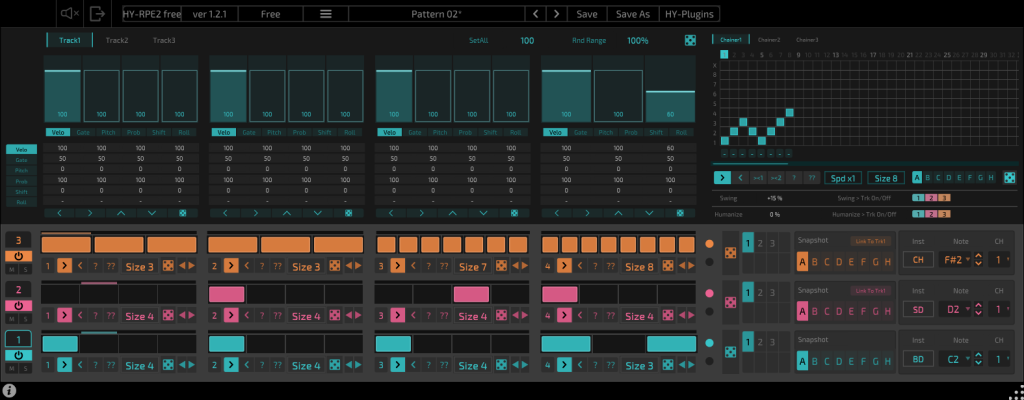
Another advanced sequencer by HY-Plugins. This one is multitrack. The sequence are divided into 4 blocks, which can be alternated within the chainer module.
The pro version has an very nice Euclidean view, which is unfortunately not available in the free version.
Pros:
- Freely scalable UI
- UI is pretty good
- Lots of features
Cons:
- Name is hard to remember
- UI text is very small
- Missing the Euclidean view from the pro version
HY-Plugins – HY-SEQ32 free

Yet another sequencer by HY-Plugins, maybe a bit more basic than the two above (which can be a good thing), but still powerful enough to be showcased here. It features a Scale module, and some nice randomization features.
Pros:
- Freely scalable UI
- UI is pretty good
- Lots of features
Cons:
- Name is hard to remember
- UI text can be quite small
HY-Plugins – HY-SeqCollection2 free

And yet another HY-Plugins, which proposes another way to consider sequencing, with a more unusual approach. The concept here rely on the step cycles on the right, and on some actions to go to other directions while playing (move to next step, move to previous, stay etc) etc, but with a note which can be pivot in the sequence. So it is a bit less predictive than a usual linear step sequencer.
Pros:
- Freely scalable UI
- UI is pretty good
- Lots of features
Cons:
- Name is hard to remember
- UI text can be quite small
MIDI Arpeggiators
Arpeggiators are about about taking your input notes (singular or chords) and turning them into arpeggios patterns. Main desirable features would be the ability to choose some arpeggios types (up, down etc…), rhythm, scales, chord recognition, and why not a bit of randomization.
These kind of modules are sometimes built-in into virtual instruments directly, but dedicated tools can offer more features (and works with any instrument plugin down the line).
Note that some Arpeggiators plugin were placed on the Sequencers section just above.
Honorable Free Alternatives
- OMG Instruments – BlueARP: advanced features, but UI isn’t re-sizeable, making it quite difficult to read
Best Commercial Alternatives
- Venomode – Phrasebox: this plugin is next level MIDI arpeggiator
- BLEASSE – Arpeggiator: simple use yet advanced arpeggiattor
CodeFN42 – RandARP

Simple to use basic arpeggiator.
Pros:
- Simple
- Several arpeggio directions and patterns
Cons:
- Windows only
- UI doesn’t scale with mouse (only via parameters in settings)
- Maybe a bit too simple
MIDI Theory – Composition
These VST will help you while composing, by being informative (telling your about chords and scale), or going further by generating chords progressions and melody for you.
Some of these plugins are very advanced and also take care of MIDI Harmonizing or Sequencing features.
I actually didn’t find any free plugins in this category which could match every requirements I have for showcase (especially the necessity of being still maintained). Though, there are advanced things in web app format, like ChordSeqAI, which could be considered. I didn’t explored other web based solutions, as the integration within a DAW is what we are looking for.
Best Commercial Alternatives
- Scaler Music – Scaler 3: This is one of the most advanced musical theory plugin, definitely worth taking a look!
- Captain Plugins: This set of plugins contains various dedicated tool for generating musical ideas
- LANDR – Composer: AI assisted chords and melody generation
- Audiomodern – Riffer: Piano roll based sequencer
- Audiomodern – Chordjam: Advanced chord oriented VST with composition assistant features
- SongWish – reMIDI 4: Advanced MIDI sampling with compositions tools
- W.A. Production – InstaComposer 3: Advanced MIDI composition assistant with scale and chord progression features
MIDI Analytic
Analyzing a MIDI signal can help trouble-shooting a MIDI routing.
REAPER native plugin: ReaControlMIDI with Log view

Uwin – ShowMIDI

Contrary to a lot of MIDI logger, ShowMIDI can group MIDI events per channel and device, which help debugging a lot.
It was finalist on the MIDI Innovation Award 2024. It is promising indeed, but it is currently lacking some features for my needs (I wanted to have channels displayed next to each others, not in columns, to monitor a MIDI to DMX based Light Show).
Pros:
- Scalable UI
- Readable
- Support MIDI 14-bits
- Open-source
Cons:
- UI could be more flexible (very narrow vertical layout)
- Graphs resets when UI is closed (despite the plugin still running)
- Didn’t find a way to have a fixed layout
MIDI Control
Plugins in this category are enhancing your DAW control via MIDI.
Helgoboss – ReaLearn
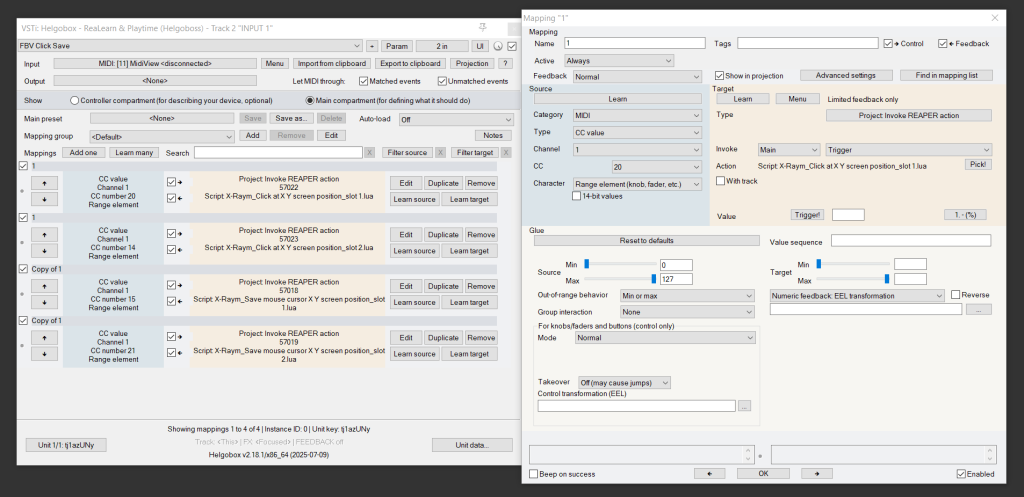
Must-Have. ReaLearn is a REAPER-specific VST which aims to control your DAW from various sources (typically, MIDI, but can OSC, KeyBoard, StreamDeck…) to different targets (track / FX parameters, actions, regions properties etc…). It’s developer, helgoboss, is one of the most advanced of the REAPER community, and bring stellar support, even for free users. It has been showcased at Superbooth 2025.
This plugin is a must-have for REAPER users interested in linking a MIDI hardware controller to REAPER, as it really goes far beyond what native REAPER can do with MIDI param linking and actions MIDI binding (for which you can’t chose a particular input device, defined presets etc…). It is so good that I already write a dedicated article about it on ReaLinks.
Pros:
- Open source
- Lots of modulation possibilities
- Very good support
Cons:
- UI could be a bit more fancy, but at least it is perfectly accessible
Audio to MIDI
Converting audio to MIDI in real time perfectly is a Grail. And doing it for free is a dream. Regularly, a new plugin to do that is out (most recent being Pitch Perfekt), often meant to work from a particular source (voice, guitar, drums…). Not a lot are free, and not a lot are good. I mean, they do the job, somehow, not necessary better than REAPER native ReaTune though.
I never found a solution which I would consider reliable. There are always note jumbs, which are quite irritating, and it requires quite some editing cleaning to have a good result. That is why I don’t have anything to showcase in this category. Though, there is one plugin which seems very promising: JAM Origin – MIDI Guitar 3. It is currently in open beta, meaning, you can use it for free, if you join the beta program. It is Guitar oriented, and is probably the only way to have a good Audio to MIDI plugin (if not the best). It will become paid later in future, so it might be the time to try it while it’s publicly available.
MIDI Editors
(Update 2026-06-28): For some very specific needs (microtonal, advanced MPE editing), plugins replacing acting like a MIDI editor where you draw notes and events can be more easy to use than the native MIDI editors. Though, you won’t benefit from having MIDI items, as the MIDI data is registered in the plugin. For REAPER users, I think it would be better to use MIDI Editor scripts than plugin, that is also why I didn’t explore much this category of plugin. Still, they can solve some cases in unique ways, so here is a quick showcase.
Best Commercial Alternatives
- MIDISketch – MIDI Scout: Advanced MPE editing with microtonal support, and interesting glides display.
Ankalot – XenRoll
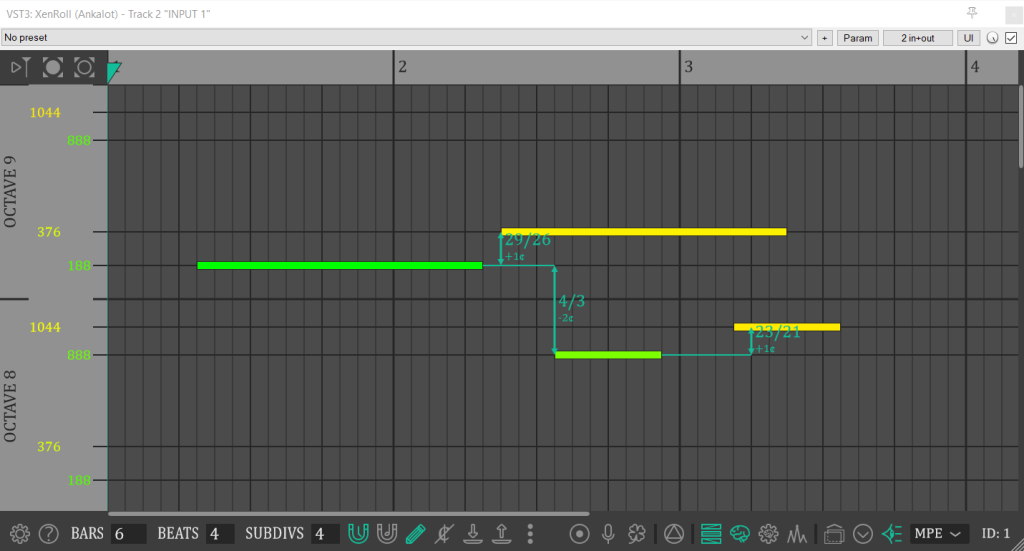
XenRoll is a free open source MIDI Editor VST specifically meant for microtonal.
Pros:
- Open source
Cons:
- UI may be a bit old school
- May lack a bit of documentation
Going Further
That sum up our small MIDI plugin showcase!
I encourage you to take a look at these plugins manufacturers websites, because if a company makes a great plugin, there is a high chance it has other nice stuffs to propose (free or paid). Buying a paid product to these devs would also be the best way to support there work, and allow them to continue sharing stuffs for free!
To find other free plugins, and follow new releases, check up these websites:
If you think I miss anything very special, you can put them as comment. I also opened a dedicated thread on Cockos Forum.
Don’t forget to update your plugins regularly, to not miss any new enhancements, fixes or features! I personally check updates before any new big projects. Some plugins can have an update notice system, but most free plugins don’t. If they come with a product manager software, update notices will be available here. Else, you can try the KVR Studio Manager software (free and currently in beta version), or just check the plugin manufacturers by your own.
This list took days to elaborate, so once again, please consider supporting my work, thanks!
In the next article, we will surely go through free samples, or MIDI effects, not sure yet. Meanwhile, please share this list to your fellow REAPER users companions, or any other DAW users! ❤️ Stay tuned!

